How Gmail’s New Promotion Tab Features Could Change Your Email Strategy
Andrew LeClair
|
Senior Director, Product Marketing
February 25, 2026
Share
LinkedIn
X
Email
Copy URL
Copy Page
Open in ChatGPT
Open in Claude
IN A NUTSHELL
• The Promotions Tab is now a curated, engagement-ranked environment • 75–85% of Gmail users have kept relevance-based sorting turned on • “Above the fold” placement is driving measurable gains in opens and retention • Relevance is earned through consistent engagement, not increased send volume
In September 2025, Google rolled out one of the biggest updates to Gmail’s Promotions Tab since its debut. Now that the changes have been live for several months and fully rolled out to users, we have clearer insight into what’s actually happening inside the inbox.
If your brand relies on email to drive revenue, this is already impacting performance.
Here’s what we now know.
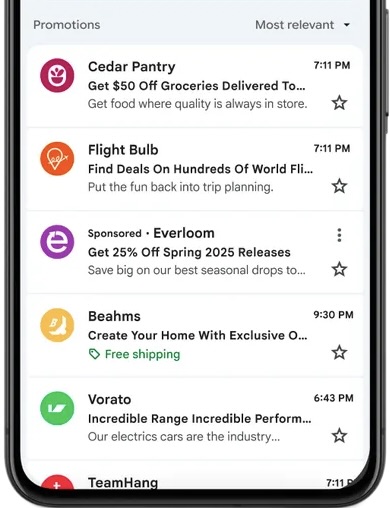
Promotions Sorted by “Most Relevant”
By default, Gmail now shows promotional emails in order of relevance, not recency. Users can still switch to “Most Recent,” but most will see emails from the brands they interact with the most first.
Google has not published its full methodology, but behavior strongly mirrors how the Primary tab determines “Important” messages. The signals appear to fall into three categories.
Key signals likely include:
Social features: Measures how a recipient interacts with your emails—opens, clicks, replies, how frequently they engage, and what portion of your emails receive a response. It also considers broader trends across Gmail, such as how users with similar interests interact with comparable emails.
Content features: Looks at which words and phrases encourage—or fail to encourage—action, such as “Exclusive Deal,” “Limited Time Offer,” or “20% Off” in subject lines, headers, or email content.
Label features: Considers how users manage emails, including starred, archived, or deleted messages.
Note:Gmail also uses thread features in the Primary tab to flag messages as Important. These track interactions within email conversations, including who started the thread and any replies—but email threading is rare in the Promotions Tab.
Maximize Your Peak Season Strategies
Download the comprehensive guide to make the most of Cyber 5 sales.
Now that the feature is fully rolled out, we are seeing measurable impact for brands ranking in the top three to five “Most Relevant” positions:
5–15% lift in opens
13–17% reduction in unsubscribes
3–4% decrease in CTR
The slight dip in click-through rate is likely influenced by AI-generated summaries and enhanced annotations. These features surface key details such as discounts, expiration dates, and product visuals before users open or click. Some engagement is happening directly within the inbox preview experience.
Visibility is driving stronger opens and improved retention, but the definition of engagement is evolving.
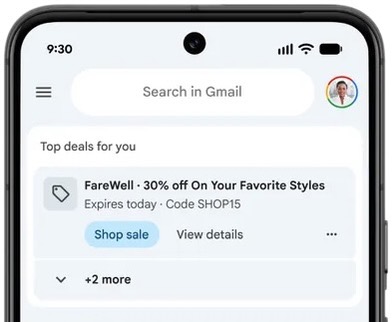
“Top Deals for You” Nudges
Gmail now surfaces time-sensitive deals in a dedicated section so users don’t miss them.
Similar to “Most Relevant” sorting, Google hasn’t shared the exact formula behind these nudges. But it’s likely that Gmail leans on the same signals as “Most Relevant,” with a few extra cues around urgency and format.
One of the biggest factors? Time-sensitive promotions. Emails that clearly show an expiration date—whether in the annotation, subject line, header, or body—are more likely to be nudged.
Google also notes that “emails will be recommended regardless of whether annotations are included,” but adding them could improve your chances. Annotations can highlight key info like discount codes, offer details, or expiration dates—and can include visuals, from a single image to a carousel of product shots.
While full testing will be needed once this feature is available to all users, annotations will likely be the first place Gmail checks for time-sensitive information, which can improve your odds of landing in the Top Deals section.
Tips to Navigate Gmail Changes
Boost Relevance with Personalization—Tailor content for each customer. Personalized emails are more likely to be opened and clicked and less likely to be ignored or deleted - which is the primary way to find yourself atop the Most Relevant list.
Optimize Timing and Frequency—Sending more emails won’t automatically get you noticed. Because Gmail measures engagement as a percentage of total sends, too many ignored messages can actually lower your ranking. Using Da Vinci’s Frequency Optimization and Send-Time Personalization ensures each customer gets the right number of emails at the right time for maximum engagement.
Add Time-Sensitive, Real-Time Content—Want a better shot at appearing in Top Deals nudges? Try adding time-sensitive Studio Tactics like countdown timers, add-to-calendar prompts, or limited-time polls that automatically adjust as your promotion runs.
The Bottom Line
Gmail’s Promotions Tab isn’t just a list of recent emails anymore—it’s a curated inbox where relevance rules. Marketers who focus on personalized content, send at the right time and frequency, and include dynamic, time-sensitive elements will be best positioned to grab attention and drive results. Check out the resources below for inspiration.
Share
LinkedIn
X
Email
Copy URL
Copy Page
Open in ChatGPT
Open in Claude
Related Resources
Think Summit Europe 2026: Marketer x Machine Takes London
Activate your data into personalized content in any customer engagement. Get a demo to see why the world’s most innovative brands rely on Movable Ink to drive customer engagement and accelerate their marketing performance.







.png)

.png)
.png)
.png)
.png)
.png)


